
Features
Everything a planbook does, and the part the others skip.
Your schedule, as it really is
Set it up once in a short wizard; change it any time.
- Bell schedules
- Blocks with times, a class in each, lunch and specials as free blocks.
- Rotations
- Weekly, A/B, or a numbered cycle (Day 1 to Day 6). A new timetable mid-year starts a new rotation from that date.
- Day patterns
- Half days, early releases, testing days and delayed openings, each with its own blocks.
- The snow-day rule
- Does a closed day advance the letter day or not? Your district decides; so can you.
- Holidays and marking periods
- No-school days, quarter ends, and a heads-up when the calendar changes after you planned.
The shift tool
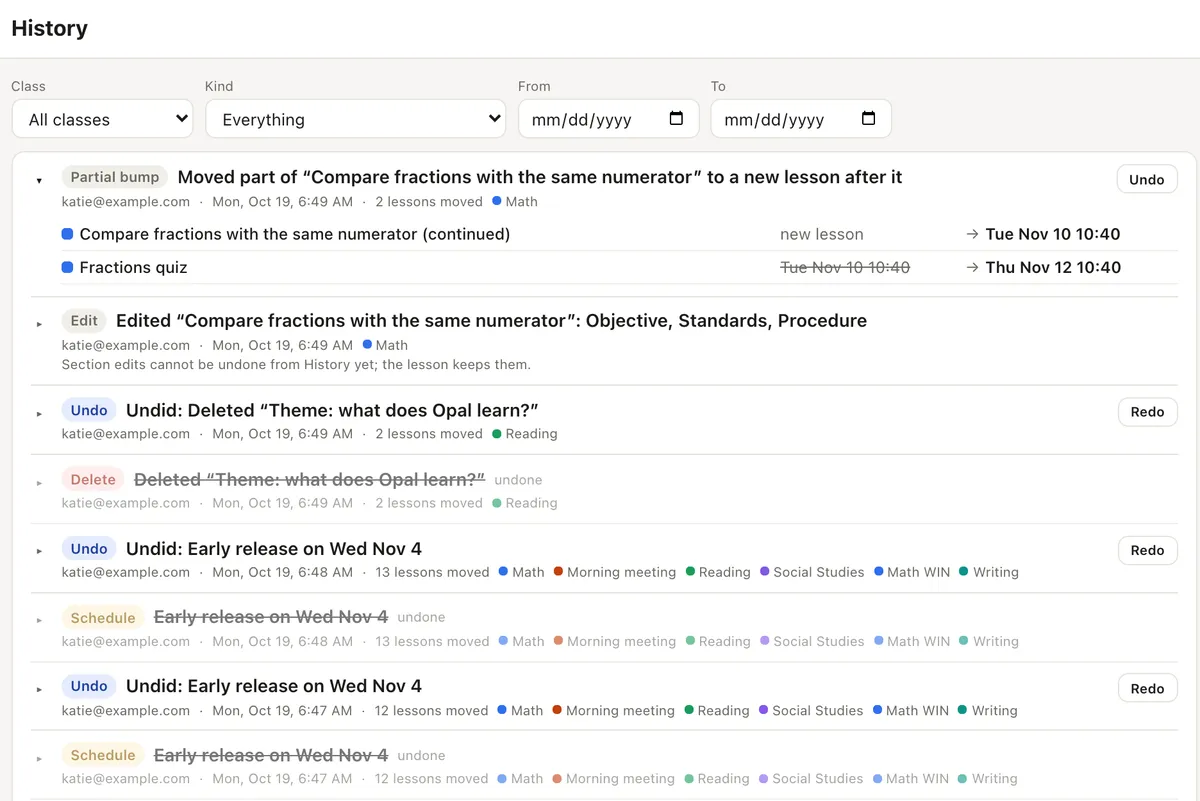
The reason to switch. Every move is previewed and every change can be undone.
- Push and pull
- One lesson, one class, several classes or the whole day, forward or back. Pulling back never deletes a lesson.
- Snow days and early releases
- Absorb a closed day, or change a day’s pattern, and every class moves to its own next meeting.
- See it first
- Every lesson that moves, with its old and new date. Untick one to keep it. Stop at the end of the week or the quarter.
- Pins and spans
- Pin the test to Friday and it stays. A lesson can take two days and moves as one.
- Move part of a lesson
- Ran out of time? Move what you did not get to into a new lesson after it.
- History and undo
- Every change, who made it and what it moved. Undo from the toast, or from History later.
Lessons and units
Your sections, your way.
- Templates
- Objective, materials, procedure, differentiation, homework: rename, reorder or hide sections.
- Files and links
- Attach handouts and links to a lesson; list them on the printout if you want.
- Copy and repeat
- Copy a lesson, a day, a week or a unit; link copies so they stay in step; repeat “every Monday, morning meeting”.
- Units
- Name a run of lessons, see its dates, and re-pace it to end by a date.
- Next year
- Start a new year from this one, with what happened to each lesson beside it.
Standards
Tracked, never policed.
- Frameworks built in
- Common Core (math and ELA), NGSS, Texas TEKS and the Massachusetts frameworks, plus your own custom standards.
- Tag as you plan
- Introduce, practise or assess, on a lesson or a whole unit.
- Coverage
- Taught, scheduled and missing, per class, with a sparkline through the year.
- Pacing alerts
- A standard with nothing scheduled before its target date shows up while there is time to act. Find a slot in one click.
- Reports
- Export coverage for your principal or coach.
Sharing, teams and comments
Planning is a team sport; nobody’s week gets overwritten.
- Share
- Invite viewers and commenters, or limit someone to the classes they co-teach. Editors are on Pro.
- Read-only links
- For a principal, a coach or a sub: pick the classes and dates, set an expiry, see who has looked.
- Edit together
- Two teachers in one lesson, live, with each other’s cursor.
- Comments
- On a lesson or a day, with mentions and suggestions you accept or reject.
- Teams
- A grade-level team plans a unit once; it flows onto each teacher’s own calendar, and a teacher’s own change stays theirs. (School plan.)
Printing, sub plans and your data
Boring where it should be.
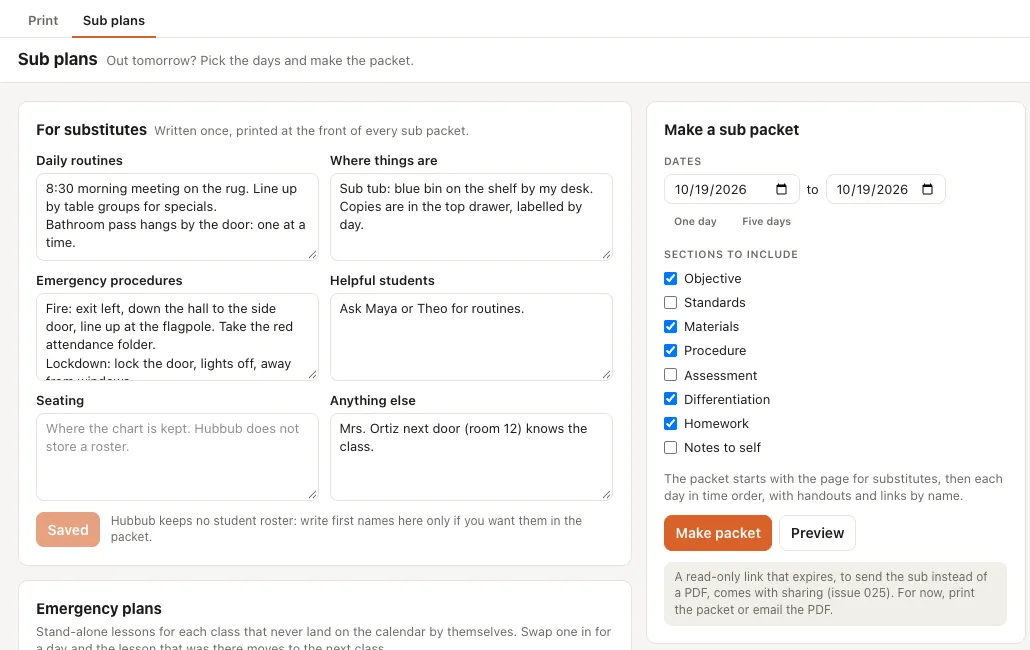
- A week, a day, a date range or a lesson, as a clean PDF.
- Sub plans
- Your routines and where things are, written once; a packet for the days you will be out; a bank of emergency lessons to swap in.
- Import
- From PlanbookEdu and Planbook.com exports (PDF, Word, CSV), or paste a table.
- Export
- Every planbook as PDF, Word, CSV and JSON, on every plan, whether you pay or not.
- Search
- Every lesson, unit and file; press / and type “push math to Monday”.
Calendars and Google
Your school’s calendar in, your plans out.
- School calendars
- Follow your district’s calendar link (ICS). TeachDay proposes the no-school days and early releases; you review each one before it touches your plans.
- Your plans as a calendar
- Publish your lessons as a private calendar link for any calendar app.
- Google Calendar, Drive and Classroom
- Read a school calendar from Google, put lessons on a calendar of their own, attach files from Drive, and post a lesson to Google Classroom. Each one is connected on its own, with the narrowest access Google offers. (Pro.)
Anywhere you plan
Fast on a Chromebook, between classes on a phone.
- Phone
- One day at a time, swipe for the next, and the common actions in one tap. Install it to your home screen.
- Offline
- This week and next stay readable without a connection.
- Keyboard
- Everything works from the keyboard. ] and [ push and pull the lesson you are on.
- Easier to read
- Switch to the Atkinson Hyperlegible typeface in Settings.